Mobile Digital Signing: How Safe Is It Really?
Mobile digital signing is as safe as its weakest architectural link. The device hardware — Secure Enclave, TEE, hardware-backed keystore — is not the risk. The risk is the identity-proofing shortcut some vendors take at onboarding, the signing key that lives in app storage instead of the hardware root, and the missing Long-Term Validity + qualified timestamp that would defend the signature years later. A chip-anchored ICAO 9303 identity proofing plus Dual Key architecture plus AdES-level cryptographic binding to the document produces a mobile signature that is not only safe but structurally stronger than most desktop-signed alternatives.
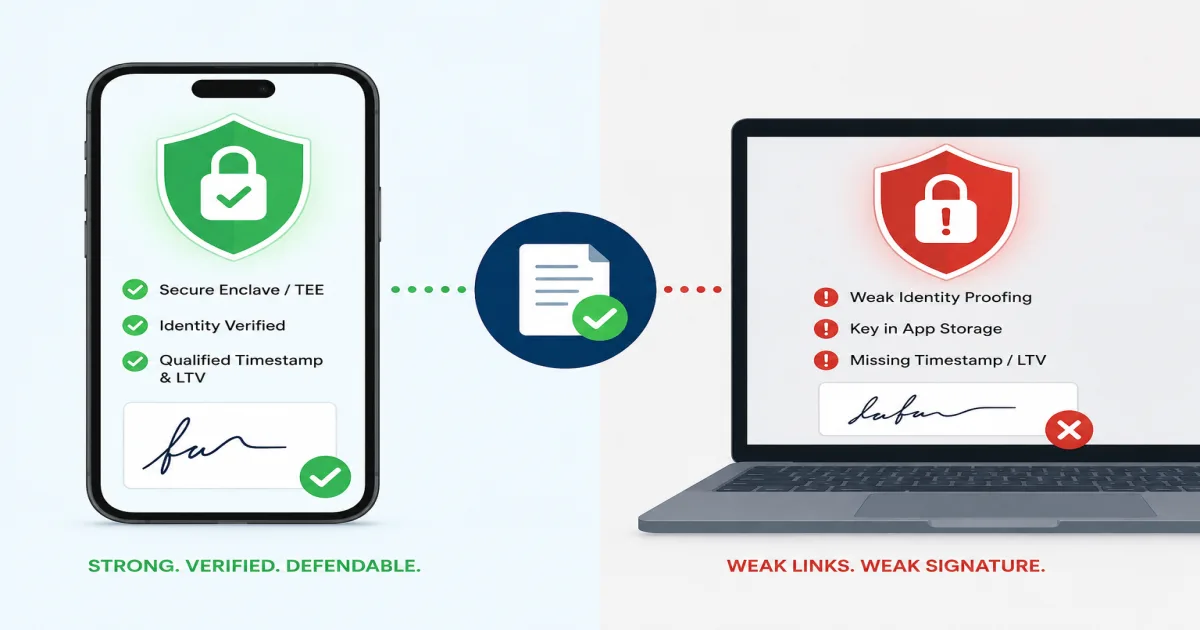
Mobile digital signing is as safe as its weakest architectural link. The device hardware — Secure Enclave, TEE, hardware-backed keystore — is not the risk. The risk is the identity-proofing shortcut some vendors take at onboarding, the signing key that lives in app storage instead of the hardware root, and the missing Long-Term Validity + qualified timestamp that would defend the signature years later. A chip-anchored ICAO 9303 identity proofing plus Dual Key architecture plus AdES-level cryptographic binding to the document produces a mobile signature that is not only safe but structurally stronger than most desktop-signed alternatives.
A Nordic mobile-banking platform's compliance lead sent us an incident-review question at a recent conversation, after their internal red team had exercised the mobile-signing flow on their production app. The exercise confirmed what most modern signing platforms already assume — the phone's hardware security module can hold a signing key without extraction risk. What the exercise also surfaced, and what the compliance team had not anticipated, was that the identity-proofing at account-opening was a self-uploaded ID photo with no chip verification, and the platform's per-signature evidence did not include a qualified timestamp. Two architecturally distant weaknesses converged to make the signatures produced on that platform substantially less defensible than the "mobile signing is secure" positioning implied. This post is that architecture, in the shape a compliance officer, mobile-app product lead, or signing-platform procurement audience needs.
What actually makes mobile signing safer or riskier than desktop signing?
Modern smartphones are, on hardware alone, more secure signing environments than most desktop workstations. Every major mobile platform — iOS via Secure Enclave, Android via Trusted Execution Environment (TEE) + StrongBox Keymaster — provides a hardware-anchored key store that meets or exceeds Common Criteria EAL 4+ certification. The signing key can be generated inside that hardware, used for signing operations inside that hardware, and never leave that hardware. That is a stronger security posture than a typical desktop signing platform, where the key often lives in software storage or a certificate manager the operating system can be tricked into exposing.
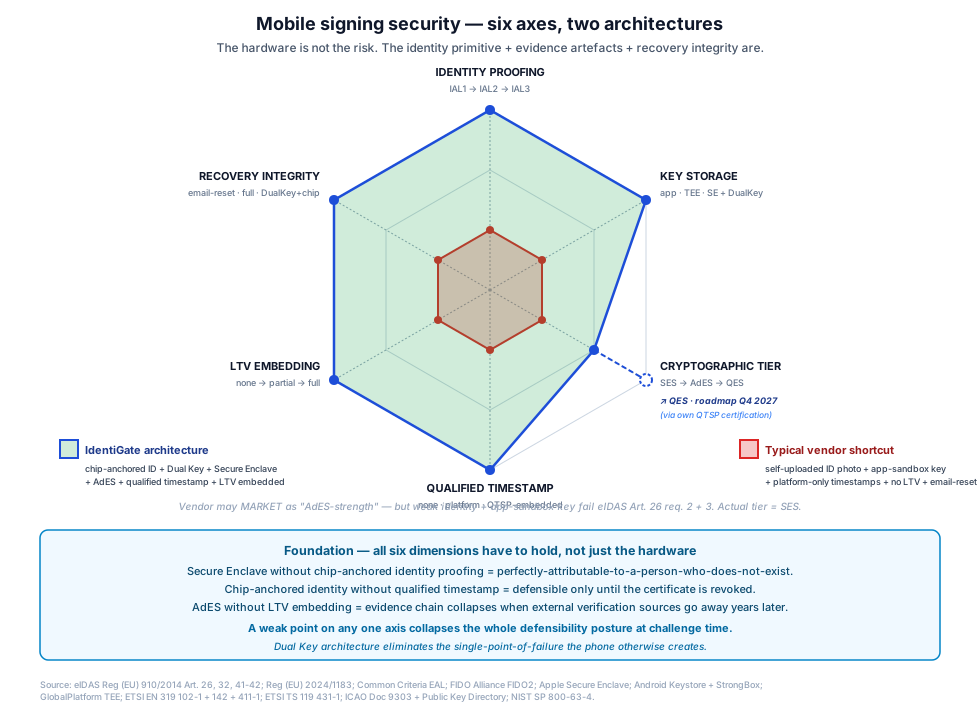
So the hardware is not the risk. What actually determines mobile-signing safety is where in the mobile stack the vendor architects each link of the signing chain — and, more decisively, what identity-proofing evidence the vendor collected at onboarding to anchor the signing key to a specific verified person.
The three architectural questions that separate defensible mobile signing from marketing-story mobile signing:
Does the private key actually live in hardware? Not "in the app," not "in the app's encrypted storage," not "in the vendor's cloud HSM synced to the app" — inside the phone's Secure Enclave or hardware-backed keystore, non-extractable. Many mobile-signing vendors advertise "hardware-backed keys" while actually storing the key in application sandbox storage with hardware-derived encryption. That is a different threat model.
Was the identity behind the key chip-anchored at onboarding? The signing key is only as strong as the identity-proofing event that anchored it. A key that was provisioned after a self-uploaded ID photo is defensible only to the strength of that photo verification. A key provisioned after ICAO 9303 passport-NFC read plus biometric face-match is defensible to a different level entirely.
Are the per-signature evidence artefacts embedded at signing time? Qualified timestamp, LTV embedding, cryptographic binding to the specific document bytes — walked in What If My Private Key Gets Stolen?. These artefacts survive the mobile-vs-desktop question entirely; they are what make any signature defensible under ETSI EN 319 102-1 validation procedures years later.
Where I most often see mobile-signing risk hide in vendor deployments is in a mismatch between marketing claims and architectural reality — vendors describe their product as "chip-anchored + hardware-secure + AdES-level" while one or two of those elements is missing under the covers. The device hardware is genuinely strong. Whether the deployment uses it correctly is a separate question.
Where does the private key actually live on the phone, and does that matter?
Yes. It matters more than any other single technical choice in a mobile-signing architecture.
Three distinct storage models exist in production deployments today:
Model 1 — Hardware Root of Trust (Secure Enclave / StrongBox Keymaster). The private key is generated inside a dedicated security co-processor (iOS Secure Enclave, Android StrongBox on Pixel-class devices, Samsung Knox on Samsung devices). The key never leaves that hardware — signing operations are performed inside it. This meets the FIDO2 authenticator level requirements for hardware-backed keys and satisfies Common Criteria EAL 4+ or above certification depending on the specific implementation. This is the model any serious mobile-signing deployment should use.
Model 2 — Trusted Execution Environment (TEE) key storage. The private key lives in a TEE (ARM TrustZone on Android, iOS Secure Enclave for lower-tier keys). Better than software storage but with different attack surfaces than Model 1 — some TEE implementations have had documented vulnerabilities. Acceptable for standard-tier signing, arguably insufficient for high-assurance signing.
Model 3 — Software / app-sandbox storage. The private key lives in encrypted application storage, protected by a passphrase or biometric-derived key. This is the model that many mobile-signing apps actually use — including some that market themselves as "hardware-secure." The key is extractable under sophisticated attack, does not survive jailbreaking / rooting, and produces signatures whose forensic defensibility is substantially weaker.
The right test to distinguish these models is not what the marketing says — it is what the vendor documents at the platform level. iOS-specific: does the key use Secure Enclave-backed kSecAttrTokenIDSecureEnclave attribute? Android-specific: does the key use StrongBoxBacked = true in the KeyGenParameterSpec? If the vendor documentation cannot answer those two questions directly, the deployment is probably Model 2 or Model 3, whatever the marketing implies.
Where Dual Key architecture actually changes the mobile-signing risk profile is that the private key does not sit entirely on the phone at all. Under IdentiGate's Dual Key architecture — walked in the defence context in Identity of Things in Defence — the signing key is split between the user's device credential and a server-side HSM. Neither the phone alone nor the server alone can produce a valid signature; both are required. A physical theft of the phone, an OS-level compromise, or even a Secure Enclave extraction attack (research-grade adversary) does not yield a viable signing capability, because the other custody half lives elsewhere. That fundamentally reshapes the mobile-signing threat model — the phone is no longer a single point of failure.
What identity-proofing shortcuts do mobile vendors take, and why do they fail?
The identity-proofing event at onboarding is the anchor for every subsequent signature the mobile platform produces. It is also, in my experience, the load-bearing architectural decision that most vendor pitches understate.
The typical mobile-onboarding shortcut looks like this: the user downloads the signing app, opens an account with an email address, takes a photo of a national ID or passport, takes a selfie, and the vendor's algorithm compares the two. The result is a Level 2 assurance identity per NIST SP 800-63-4 IAL2 — good enough for many commercial contexts but bounded by what a document photograph can prove. The document could be a very high-quality forgery. The selfie could be a captured video played into the camera through a virtual device. Both attack vectors are documented in real production incidents.
The chip-anchored alternative uses the phone's NFC reader to read the signed data structure on the passport chip directly — the same ICAO Doc 9303 verification a border-control officer performs at an airport. The chip's data is cryptographically signed by the issuing country's certificate authority, verifiable against the ICAO Public Key Directory. A biometric face-match then compares the live user against the on-chip portrait. Together this produces a Level 3 assurance identity that is materially harder to spoof than the photograph-comparison model — 179 countries currently issue ICAO 9303 chip-anchored travel documents, plus document + face-match for the remaining countries reaches the same evidential level. The connection between the identity primitive at onboarding and every subsequent signature's evidential weight is walked in Do Digital Signatures Require Proof of Identity?.
A Southern European insurance carrier's mobile-onboarding architect I reviewed a platform with last year had exactly this failure mode inverted: strong Secure Enclave-backed signing keys, but the onboarding was a self-uploaded photo with no chip verification and no liveness attack detection. When the platform's fraud team later ran an internal red team against the onboarding flow using off-the-shelf deepfake tools plus a passport-photo scan-and-print, the attack succeeded and produced a fully-onboarded account whose subsequent mobile signatures inherited the fraudulent identity anchor. The Secure Enclave held those signatures perfectly — perfectly attributable to a person who did not exist. Hardware strength did not compensate for onboarding weakness.
Where I disagree with the loud mobile-signing pitch is that the hardware conversation is often the entire pitch. Vendors emphasise Secure Enclave, StrongBox, EAL 4+ certification — all real, all valuable, none of which address the identity-proofing question that determines whether the signature can be attributed to a specific verified human. The identity primitive is upstream of the hardware. Both have to be right for the mobile signature to be defensible.
What should you check in a mobile-signing procurement quote?
Six questions to put to any mobile-signing platform quote or architecture review. The vendor's answers will usually tell you more than the certification badges do.
-
Where does the private key live specifically? Not "hardware-backed" — the exact storage model (Secure Enclave / StrongBox Keymaster / TEE key store / app-sandbox storage). If the vendor cannot document this at the OS-API level (iOS
kSecAttrTokenIDSecureEnclave/ AndroidStrongBoxBacked), the answer is probably Model 3. -
Is Dual Key architecture used, or is the key entirely on the device? Single-device-only keys carry a single-point-of-failure risk that Dual Key eliminates. Ask specifically whether the signing operation requires two custodians (device + server HSM) or whether the phone alone can produce a valid signature.
-
What identity-proofing was performed at onboarding? Chip-anchored ICAO 9303 passport-NFC + biometric face-match (Level 3 assurance), document-plus-photograph (Level 2), or email-plus-SMS (Level 1). The signing key is only as strong as this event.
-
Is qualified timestamp embedded per signature under eIDAS Articles 41-42? Not "the platform records signing time" — an independent third-party attestation from a QTSP, embedded in the signed record. If timestamps are internal-only, pre-compromise defensibility is severely weakened.
-
Is LTV embedded per signature under ETSI EN 319 142? Certificate chain + revocation status snapshot + timestamp tokens captured inside the signed record at production time. Without it, verification years later depends on external sources that may not be available — walked in What If My Private Key Gets Stolen?.
-
What happens if the user loses the phone? Key rotation, revocation propagation, and re-provisioning workflow — end-to-end. If the answer involves resending an email-based reset link, the recovery path is weaker than the signing path and creates a substitution attack surface.
My take on this: mobile signing is the right choice for almost every deployment where the user is going to be signing more than three or four documents per year. The friction cost of desktop signing at scale is real. The security case for mobile signing is genuine when the architecture is right. What fails deployments is not the mobile-vs-desktop question — it is treating "mobile-signing platform" as a commodity category and choosing on unit price rather than on the six-question architecture audit above.
Where IdentiGate fits
IdentiGate produces Advanced Electronic Signatures from mobile devices using Dual Key architecture — the signing key is split between the user's device credential (Secure Enclave / StrongBox-backed) and a server-side HSM, so neither party can produce a valid signature alone. Every signature carries qualified timestamp + Long-Term Validity embedded by default. Our identity verification layer anchors every mobile signing account to a chip-anchored ICAO 9303 passport-NFC + biometric face-match event at onboarding — 179 countries plus document + face-match for the remaining jurisdictions — so the identity primitive under every subsequent signature is at Level 3 assurance rather than the Level 2 that document-photograph verification produces. Our authentication layer handles the per-signing biometric or PIN challenge, keeping the signing operation gated behind the user's active consent at each event.
If your mobile-signing procurement includes a security architecture review and the six-question audit above surfaces gaps — or if you have deployed a mobile-signing platform and want a defensibility stress-test against a red-team attack playbook — get in touch.
More in this cluster
- What's the Difference Between Hash and Digital Signature?
- Post-Quantum eIDAS Signatures: 7 Questions for Your TSP
- What Encryption Does a Digital Signature Use?
- What's the Difference Between a Digital Signature and an Electronic Signature?
- Can You Sign Multiple Documents with One Digital Signature?
Sources
Legal + regulatory frameworks
Mobile-hardware security standards
- Common Criteria — EAL certification framework
- FIDO Alliance — FIDO2 authenticator specifications
- Apple Platform Security — Secure Enclave
- Android Keystore + StrongBox documentation
- GlobalPlatform TEE specifications
Signature + trust service standards
- ETSI EN 319 102-1 (Signature Validation Procedures)
- ETSI EN 319 142 (PAdES — long-term validity)
- ETSI EN 319 411-1 (TSP Certificate Policies)
- ETSI TS 119 431-1 (server-side signing components)
Identity + assurance standards
- ICAO Doc 9303 (Machine Readable Travel Documents)
- ICAO Public Key Directory
- NIST SP 800-63-4 (Digital Identity Guidelines)
About the author
Gustav Poola is a co-founder of IdentiGate, a European identity-verification and digital-signature company building on top of chip-anchored identity-proofing (ICAO 9303 passport NFC), Advanced Electronic Signatures (eIDAS Article 26) with Dual Key architecture, Advanced Electronic Seals, and hardware-anchored Identity of Things. He works on the architecture side — deployment patterns for cross-border teams in logistics, healthcare, fintech, HR-tech, defence, and cybersecurity — and writes about the intersection of cryptographic primitives, hardware security, and the practical decisions engineering and procurement teams have to make together.